Resident Placements

Lennox & Addington County General Hospital (LACGH) is a proud teaching facility, welcoming Queen’s Medical Residents and students to gain valuable clinical experience alongside our dedicated physicians. We trust your learning experience will be both rewarding and beneficial.

Overview & Expectations

As we operate in a paperless, electronic environment, it is essential for all residents to complete and submit the required forms well in advance of their arrival. This ensures that staff can plan for necessary system training and provide you with timely access to hospital systems.

Important Forms & Resources

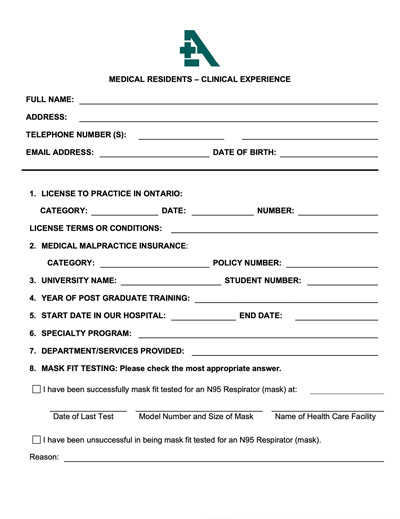
Medical Resident Forms Package

Download and complete before your rotation.

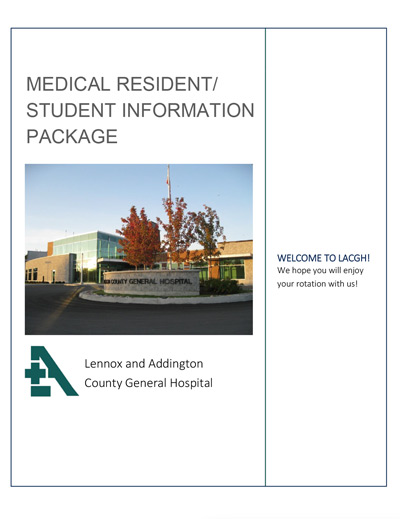
General Information Package

Review essential guidelines prior to arrival.
Submit completed forms to:

Andrea Nussberger

Executive Assistant to the CEO

Lennox and Addington County General Hospital

8 Richmond Park Drive, Napanee, ON K7R 2Z4

Email: atopping@lacgh.napanee.on.ca

COVID-19 Vaccination Policy

In line with Ontario’s Directive #6, LACGH requires all students, residents, and learners completing placements or residencies on our premises to be fully vaccinated against COVID-19.
To be fully vaccinated, you must:
  • Have received the complete series (two doses) of an approved COVID-19 vaccine, or a combination of accepted vaccines.
  • Allow at least 14 days to pass since your last vaccine dose.
If you are experiencing COVID-19 symptoms, have been exposed to a confirmed case without appropriate PPE, or have recently travelled internationally, contact Infection Prevention & Control at 613-354-3301 ext. 432 before attending your rotation.

Information for Hospitalist Residents

Hospitalist Clinical Handbook

Comprehensive resource to familiarize yourself with the clinical environment.

Hospitalist Resident “Clinical Pearls Rounds”

Overview of expectations and list of presentation topics. 

MetricAid Scheduling (Hospitalist Residents)

MetricAid is the scheduling software our hospital uses for physicians. It is the master schedule and is live. Please refer to it for the days you are scheduled to be on as a hospitalist. All residents who will be doing hospitalist work are invited to MetricAid at the beginning of the academic year. If you have not received an invite, please get in touch with Dr. Crystal Gonu. As soon as you get your MetricAid invite, please be sure to:

 
  1. Enter your phone number and edit your contact information. Physicians, switchboard and unit clerks will be able to access this. We depend on this for contacting you when you are on call.
  2. Ensure your preferences are set to allow all emails so that you are aware of changes.
  3. Notify your preceptors of any and all changes that occur to your schedule.
 

Vacation requests are by invitation (you will be emailed) and are typically submitted in June and October, which, in many cases, is well in advance of your planned rotation.

Information Systems and “Service Desk”

Once the information services team has received word that your rotation paperwork has been submitted, they will work to create your access and profiles. You will be receiving an email from the Service Desk in relation to your Windows, Cerner and PACS accounts. If you have difficulties with these during your rotation, the Service Desk can be reached by contacting:

613-354-3301 ext. 491
Service.Desk@lacgh.napanee.on.ca

Access will not be granted until all forms are completed and processed.

Picture Archiving and Communication System (PACS)

The Information Services Team will create a PACS account for your use while on your rotation.

Note: GE Centricity PACS is used in the ER, while GE PACS Web is available in all other clinical areas.

Please click on the following linked documents for your reference, tips and information on PACS:

PACS Web Tip Sheet
Physicians PACS Help Pamphlet

Hospital Remote Access

Remote Access is offered to all Physicians and Hospitalist and or Family Medicine Residents. Accessing our hospital services through Citrix will require Multi-Factor Authentication (MFA). Please click on the following Enrollment Instructions:

MFA Enrollment Instructions
Download Citrix Receiver

For remote access to the hospital’s Citrix Access Gateway, you will first need to download and install the Citrix Receiver from the following link: https://www.citrix.com/products/receiver/ Once the Citrix Receiver has been downloaded you will then be able to logon to the LACGH Citrix website using the windows credentials provided by the Service Desk, Information Services Team.

Table of Contents

Advance Your Career with LACGH

Explore career opportunities at LACGH and become part of a dedicated healthcare team committed to exceptional patient care.
Health-care worker smiling and speaking with an older adult using a walker in a hospital corridor.